Setting up a SpinBetter account takes about two minutes. The process is straightforward, but there's one critical decision you make during sign-up that you can't change later: choosing between the casino and sports welcome bonus. This guide walks through every screen so you don't miss anything — especially the steps that lock in your promotional offer.
SPINNOW
Open the site in any browser — desktop or mobile. Click the "Registration" button in the top-right corner. If you're on the SpinBetter app, the registration button is in the same position.
You can register via email or through social networks (Google, Apple, X, Discord, Twitch). Email registration gives you more control; social login is faster but ties your account to that service.
This is the most important step. You'll see three options: Casino (up to €1,500 + 150 FS), Sports (up to €500), or Decline bonus. Choose carefully — once you pick one, you can't switch to the other. If you're unsure, our bonuses comparison can help you decide.
Select your country (India), choose your preferred currency, and enter the promo code SPINNOW in the designated field. Complete the form with your email and create a strong password.
Check your email for a verification link and click it. Then complete your profile by adding your phone number and verifying it via SMS. Both steps are required to unlock the welcome bonus.
Navigate to the cashier section and choose a payment method. The minimum first deposit for the casino bonus is €10. Once deposited, the bonus activates automatically.
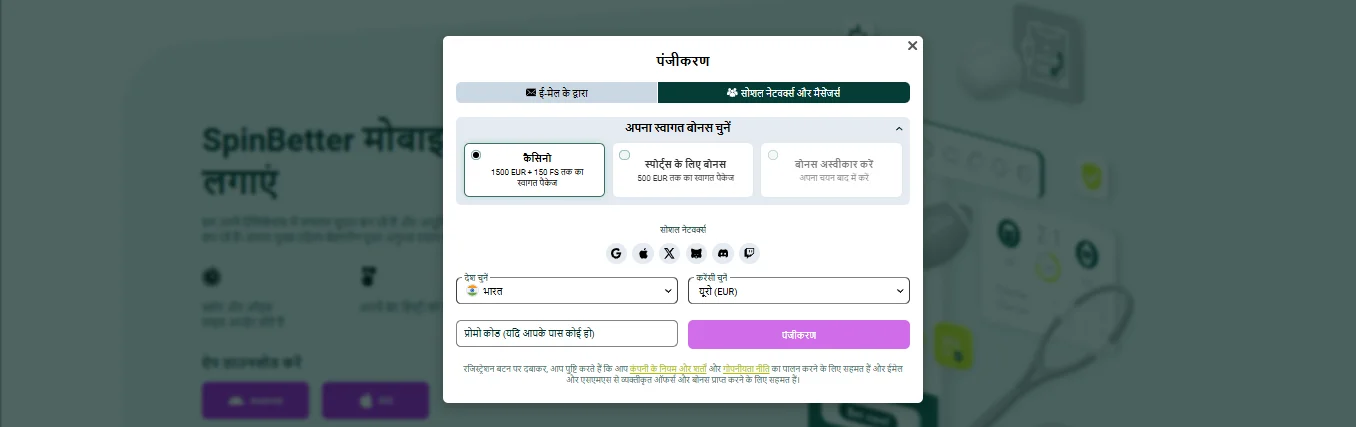
SpinBetter registration requires a valid email address (or a social account), and you must be at least 18 years old. During sign-up, you'll select India as your country and choose a currency — EUR is the most common for bonus calculations, though other options may be available. No identity documents are needed at registration, but SpinBetter may request KYC verification before your first withdrawal.
The biggest mistake new players make is forgetting to select a welcome bonus before their first deposit. If you deposit without opting in, the bonus is gone — you can't retroactively claim it. Similarly, not completing your profile (phone verification) before depositing means the bonus won't activate.
Other pitfalls: choosing the wrong bonus type (casino when you wanted sports, or vice versa), creating duplicate accounts (strictly prohibited — one account per person, per household, per IP), and not entering the promo code during registration when you have one.

While registration itself doesn't require identity documents, SpinBetter will eventually ask for KYC (Know Your Customer) verification — usually before your first withdrawal. The verification process typically requires a photo of a government-issued ID (Aadhaar card, passport, PAN card, or driver's licence), proof of address (utility bill, bank statement, or official letter dated within the last 3 months), and proof of your payment method (screenshot of your e-wallet account or a photo of your bank card with the middle digits hidden).
Submitting documents early, even before you need to withdraw, speeds up the process later. You can upload KYC documents through the account settings section. Verification usually completes within 24–48 hours, though it can take longer during busy periods. Once verified, future withdrawals process faster since the identity check is a one-time requirement.
Once registered and deposited, you have full access to the casino, sportsbook, live betting, and promotions. If you chose the casino bonus, head to the casino section and start playing — remember that Games bets count double toward wagering. If you picked the sports bonus, the sportsbook is your starting point.
Consider downloading the SpinBetter app for a better mobile experience and access to the exclusive free bet offer. And if you want to log back in later, our login guide covers the process.
Yes. India is available in the country selector during registration. The platform accepts Indian players and offers payment methods accessible from India.
Not during registration. You'll need email and phone verification to unlock bonuses. Full KYC (identity document) verification may be requested before your first withdrawal.
No. The casino/sports bonus selection during registration is permanent. If you switch bonus type or decline mid-package, you lose all remaining deposit bonuses.
EUR is the safest choice for bonus calculations since all bonus amounts are denominated in EUR. Your payment method handles the conversion. Check available currencies during registration.